WorldDatabase
-
class
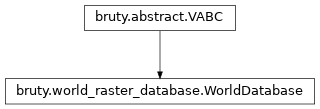
bruty.world_raster_database.WorldDatabase(backend)¶ Bases:
bruty.abstract.VABCClass to control Tiles that cover the Earth. Also supplies locking of tiles for read/write. All access to the underlying data should go through this class to ensure data on disk is not corrupted.
There are (will be) read and write locks. Multiple read requests can be honored at once. While a read is happening then a write will have to wait until reads are finished, but a write request lock is created. While there is a write request pending no more read requests will be allowed.
A survey being inserted must have all its write requests accepted before writing to any of the Tiles. Otherwise a read could get an inconsistent state of some tiles having a survey applied and some not.
Attributes Summary
Methods Summary
change_survey_score(survey_id, new_score)export_area(fname, x1, y1, x2, y2, res[, …])Retrieves an area from the database at the requested resolution.
export_area_old(fname, x1, y1, x2, y2, res)Retrieves an area from the database at the requested resolution.
export_at_date(area, date)find_area_affected_by_survey(survey_data)init_tile(tx, ty, tile_history)insert_survey_array(input_survey_data, …)Insert a numpy array (or list of lists) of data into the database.
insert_survey_gdal(path_to_survey_data[, …])Insert a gdal readable dataset into the database.
insert_survey_vr(path_to_survey_data[, …])- param path_to_survey_data
insert_txt_survey(path_to_survey_data[, …])Reads a text file and inserts into the tiled database.
merge_rasters(tile_layers, tile_score, …)remove_survey(survey_id)revise_survey(survey_id, survey_data)Attributes Documentation
-
id
Methods Documentation
-
change_survey_score(survey_id, new_score)
-
export_area(fname, x1, y1, x2, y2, res, target_epsg=None, driver='GTiff', layers=(<Layers.ELEVATION: 0>, <Layers.UNCERTAINTY: 1>, <Layers.CONTRIBUTOR: 2>))¶ Retrieves an area from the database at the requested resolution.
# 1) Create a single tif tile that covers the area desired # 2) Get the master db tile indices that the area overlaps and iterate them # 3) Read the single tif sub-area as an array that covers this tile being processed # 4) Use the db.tile_scheme function to convert points from the tiles to x,y # 5) @todo make sure the tiles aren’t locked, and put in a read lock so the data doesn’t get changed while we are reading # 6) Sort on score in case multiple points go into a position that the right value is retained # sort based on score then on depth so the shoalest top score is kept # 7) Use affine geotransform convert x,y into the i,j for the exported area # 8) Write the data into the export (single) tif. # replace x,y with row, col for the points
- Parameters
fname – path to export to
x1 – a corner x coordinate
y1 – a corner y coordinate
x2 – a corner x coordinate
y2 – a corner y coordinate
res – Resolution to export with. If a tuple is supplied it is read as (res_x, res_y) while a single number will be used for x and y resolutions
target_epsg – epsg of the coordinate system to export into
driver – gdal driver name to use
layers – Layers to extract from the database into the output file. Defaults to Elevation, Uncertainty and Contributor
- Returns
- Return type
None
-
export_area_old(fname, x1, y1, x2, y2, res, target_epsg=None, driver='GTiff', layers=(<Layers.ELEVATION: 0>, <Layers.UNCERTAINTY: 1>, <Layers.CONTRIBUTOR: 2>))¶ Retrieves an area from the database at the requested resolution.
- Parameters
fname – path to export to
x1 – a corner x coordinate
y1 – a corner y coordinate
x2 – a corner x coordinate
y2 – a corner y coordinate
res – Resolution to export with. If a tuple is supplied it is read as (res_x, res_y) while a single number will be used for x and y resolutions
target_epsg – epsg of the coordinate system to export into
driver – gdal driver name to use
layers – Layers to extract from the database into the output file. Defaults to Elevation, Uncertainty and Contributor
- Returns
- Return type
None
-
export_at_date(area, date)
-
extract_soundings()
-
find_area_affected_by_survey(survey_data)
-
find_contributing_surveys(area)
-
init_tile(tx, ty, tile_history)
-
insert_survey_array(input_survey_data, contrib_name, accumulation_db=None)¶ Insert a numpy array (or list of lists) of data into the database.
- Parameters
input_survey_data – numpy array or list of lists in this configuration (x, y, depth, uncertainty, score, flags)
contrib_name – pathname or contributor name to associate with this data.
accumulation_db – If multiple calls will be made from the same survey then an accumulation database can be supplied. This will keep the contributor from having multiple records in the history. A subsequent call to db.append_accumulation_db would be needed to transfer the data into this database.
- Returns
- Return type
None
-
insert_survey_gdal(path_to_survey_data, survey_score=100, flag=0)¶ Insert a gdal readable dataset into the database. Currently works for BAG and probably geotiff. :param path_to_survey_data: full path to the gdal readable file :param survey_score: score to use with the survey when combining into the database :param flag: flag to apply when inserting the survey into the database
- Returns
- Return type
None
-
insert_survey_vr(path_to_survey_data, survey_score=100, flag=0)¶ - Parameters
path_to_survey_data –
survey_score –
flag –
-
insert_txt_survey(path_to_survey_data, survey_score=100, flags=0, format=None, transformer=None)¶ Reads a text file and inserts into the tiled database. The format parameter is passed to numpy.loadtxt and needs to have names of x, y, depth, uncertainty.
- Parameters
path_to_survey_data – full path filename to read using numpy
survey_score – score to apply to data, if not a column in the data
flags – flags to apply to data, if not a column in the data
format – numpy dtype format to pass to numpy.loadtxt, default is [(‘y’, ‘f8’), (‘x’, ‘f8’), (‘depth’, ‘f4’), (‘uncertainty’, ‘f4’)]
transformer – Optional function used to transform from x,y in the file to the coordinate system of the database. It will be called as new_x, new_y = func( x, y ).
- Returns
- Return type
None
-
static
merge_rasters(tile_layers, tile_score, raster_data, tile_depth, geotransform, affine_transform, start_col, start_row, block_cols, block_rows, dataset, dataset_score, dataset_scorekey2, layers, score_band, key2_band, reverse_sort=(False, False))
-
remove_survey(survey_id)
-
revise_survey(survey_id, survey_data)
-
soundings_from_caris_combined_csar()
-
__init__(backend)¶ Initialize self. See help(type(self)) for accurate signature.