SingleFile
-
class
bruty.world_raster_database.SingleFile(epsg, x1, y1, x2, y2, res_x, res_y, storage_directory)¶ Bases:
bruty.world_raster_database.WorldDatabase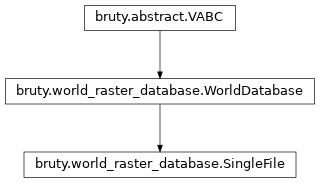
Attributes Summary
Methods Summary
change_survey_score(survey_id, new_score)export_area(fname, x1, y1, x2, y2, res[, …])Retrieves an area from the database at the requested resolution.
export_area_old(fname, x1, y1, x2, y2, res)Retrieves an area from the database at the requested resolution.
export_at_date(area, date)find_area_affected_by_survey(survey_data)init_tile(tx, ty, tile_history)insert_survey_array(input_survey_data, …)Insert a numpy array (or list of lists) of data into the database.
insert_survey_gdal(path_to_survey_data[, …])Insert a gdal readable dataset into the database.
insert_survey_vr(path_to_survey_data[, …])- param path_to_survey_data
insert_txt_survey(path_to_survey_data[, …])Reads a text file and inserts into the tiled database.
merge_rasters(tile_layers, tile_score, …)remove_survey(survey_id)revise_survey(survey_id, survey_data)Attributes Documentation
-
id
Methods Documentation
-
change_survey_score(survey_id, new_score)
-
export_area(fname, x1, y1, x2, y2, res, target_epsg=None, driver='GTiff', layers=(<Layers.ELEVATION: 0>, <Layers.UNCERTAINTY: 1>, <Layers.CONTRIBUTOR: 2>))¶ Retrieves an area from the database at the requested resolution.
# 1) Create a single tif tile that covers the area desired # 2) Get the master db tile indices that the area overlaps and iterate them # 3) Read the single tif sub-area as an array that covers this tile being processed # 4) Use the db.tile_scheme function to convert points from the tiles to x,y # 5) @todo make sure the tiles aren’t locked, and put in a read lock so the data doesn’t get changed while we are reading # 6) Sort on score in case multiple points go into a position that the right value is retained # sort based on score then on depth so the shoalest top score is kept # 7) Use affine geotransform convert x,y into the i,j for the exported area # 8) Write the data into the export (single) tif. # replace x,y with row, col for the points
- Parameters
fname – path to export to
x1 – a corner x coordinate
y1 – a corner y coordinate
x2 – a corner x coordinate
y2 – a corner y coordinate
res – Resolution to export with. If a tuple is supplied it is read as (res_x, res_y) while a single number will be used for x and y resolutions
target_epsg – epsg of the coordinate system to export into
driver – gdal driver name to use
layers – Layers to extract from the database into the output file. Defaults to Elevation, Uncertainty and Contributor
- Returns
- Return type
None
-
export_area_old(fname, x1, y1, x2, y2, res, target_epsg=None, driver='GTiff', layers=(<Layers.ELEVATION: 0>, <Layers.UNCERTAINTY: 1>, <Layers.CONTRIBUTOR: 2>))¶ Retrieves an area from the database at the requested resolution.
- Parameters
fname – path to export to
x1 – a corner x coordinate
y1 – a corner y coordinate
x2 – a corner x coordinate
y2 – a corner y coordinate
res – Resolution to export with. If a tuple is supplied it is read as (res_x, res_y) while a single number will be used for x and y resolutions
target_epsg – epsg of the coordinate system to export into
driver – gdal driver name to use
layers – Layers to extract from the database into the output file. Defaults to Elevation, Uncertainty and Contributor
- Returns
- Return type
None
-
export_at_date(area, date)
-
extract_soundings()
-
find_area_affected_by_survey(survey_data)
-
find_contributing_surveys(area)
-
init_tile(tx, ty, tile_history)
-
insert_survey_array(input_survey_data, contrib_name, accumulation_db=None)¶ Insert a numpy array (or list of lists) of data into the database.
- Parameters
input_survey_data – numpy array or list of lists in this configuration (x, y, depth, uncertainty, score, flags)
contrib_name – pathname or contributor name to associate with this data.
accumulation_db – If multiple calls will be made from the same survey then an accumulation database can be supplied. This will keep the contributor from having multiple records in the history. A subsequent call to db.append_accumulation_db would be needed to transfer the data into this database.
- Returns
- Return type
None
-
insert_survey_gdal(path_to_survey_data, survey_score=100, flag=0)¶ Insert a gdal readable dataset into the database. Currently works for BAG and probably geotiff. :param path_to_survey_data: full path to the gdal readable file :param survey_score: score to use with the survey when combining into the database :param flag: flag to apply when inserting the survey into the database
- Returns
- Return type
None
-
insert_survey_vr(path_to_survey_data, survey_score=100, flag=0)¶ - Parameters
path_to_survey_data –
survey_score –
flag –
-
insert_txt_survey(path_to_survey_data, survey_score=100, flags=0, format=None, transformer=None)¶ Reads a text file and inserts into the tiled database. The format parameter is passed to numpy.loadtxt and needs to have names of x, y, depth, uncertainty.
- Parameters
path_to_survey_data – full path filename to read using numpy
survey_score – score to apply to data, if not a column in the data
flags – flags to apply to data, if not a column in the data
format – numpy dtype format to pass to numpy.loadtxt, default is [(‘y’, ‘f8’), (‘x’, ‘f8’), (‘depth’, ‘f4’), (‘uncertainty’, ‘f4’)]
transformer – Optional function used to transform from x,y in the file to the coordinate system of the database. It will be called as new_x, new_y = func( x, y ).
- Returns
- Return type
None
-
static
merge_rasters(tile_layers, tile_score, raster_data, tile_depth, geotransform, affine_transform, start_col, start_row, block_cols, block_rows, dataset, dataset_score, dataset_scorekey2, layers, score_band, key2_band, reverse_sort=(False, False))
-
remove_survey(survey_id)
-
revise_survey(survey_id, survey_data)
-
soundings_from_caris_combined_csar()
-
__init__(epsg, x1, y1, x2, y2, res_x, res_y, storage_directory)¶ Initialize self. See help(type(self)) for accurate signature.